
Freelancer Finance OS Lite · v2.1
A free invoice tracker
for Indian freelancers.
Keep invoice dates, client names and paid or pending amounts in one place. Lite is a small XLSX workbook with an April–March dashboard. You enter and maintain the records.
One XLSX file. No email, account or subscription needed.
See the workbook before you start.
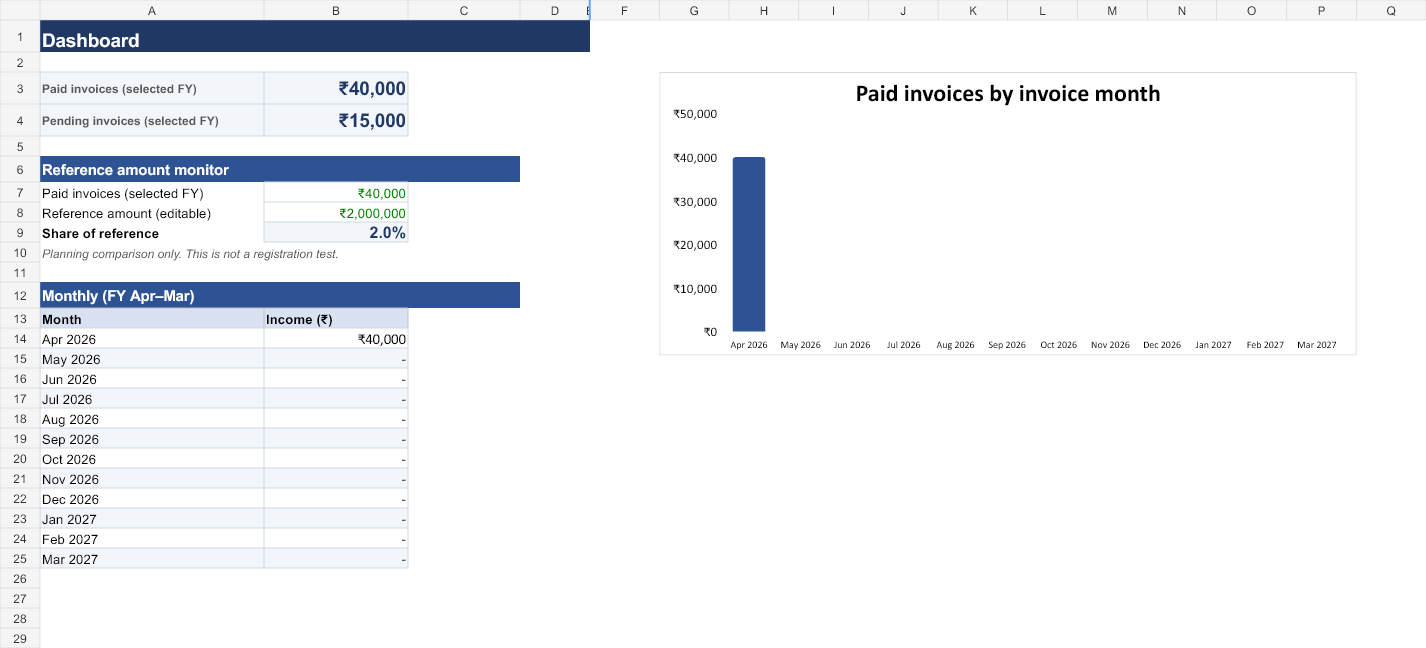
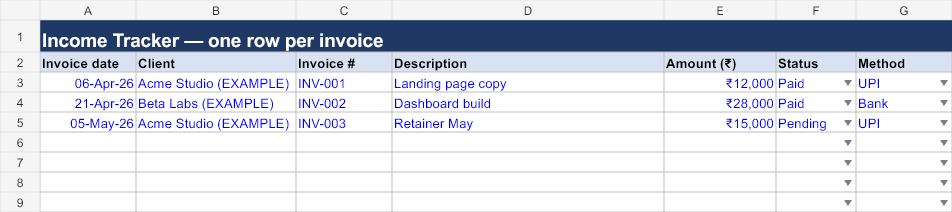
These previews show the supplied Lite workbook with its example records. They are rendered workbook views; your spreadsheet app may display fonts or charts differently.
Start with your financial year.
Download your own copy and read the START HERE tab. Open Settings and set FY start year (April) in cell B4. For example, 2026 selects 1 April 2026 through 31 March 2027.
The four tabs are START HERE, Settings, Income Tracker and Dashboard. Start with the supplied example rows so you can check how your app calculates the totals before replacing the examples with your own records.
Enter one row per invoice.
In Income Tracker, enter the invoice date, client, invoice number, description, amount, status and payment method. Use a real date value in your spreadsheet app and enter amounts as numbers. Keep client names consistent.
Mark an invoice Paid when it is fully paid, or Pending while it is outstanding. The workbook does not model partial payments.
| Invoice date | Invoice | Amount | Status |
|---|---|---|---|
| 6 April 2026 | INV-001 | ₹12,000 | Paid |
| 21 April 2026 | INV-002 | ₹28,000 | Paid |
| 5 May 2026 | INV-003 | ₹15,000 | Pending |
With the year set to 2026, these rows produce ₹40,000 paid and ₹15,000 pending. The monthly paid-invoice chart shows ₹40,000 in April; the pending May invoice is not included in that paid total.
When you are ready, replace the example invoice inputs with your own. Keep the sheet structure and formulas intact. The prepared input area covers 200 rows; follow START HERE when extending the log so new rows retain formatting and validation.
Check that it fits your routine.
Lite is useful when you want a manual record of whole invoices, a paid/pending view and a summary for your chosen April–March year. It does not issue invoices, send reminders, connect to your bank or file returns.
The file is in Excel’s XLSX format. The Lite copy opened in Excel for Windows, where its sample totals, chart and status-filter menu were checked. Editing, saving, sorting and operation in Google Sheets or LibreOffice have not yet been verified in those apps. Try the free copy in the app you intend to use and check its sample totals. Avoid relying on it for partial payments or tax-compliance decisions.
Excel tip: if a chart has not refreshed after you change a record, press F9 to recalculate, then check the chart against the monthly totals.
Full adds expense records, client details and a worksheet for estimates based on assumptions you enter. Compare the editions once you have tried Lite.